By Honest Little AppsUpdated November 2026
What safety apps actually help when you live alone?
Three kinds, and most people need two. A check-in app notices when you go quiet. A wearable with fall detection calls for help when you can’t. And an emergency card or Medical ID tells whoever arrives who to call, what you take and what you’re allergic to. Most apps on the App Store today do one of these jobs well, and a few add a piece of a second.
You’re not unusual. Over a quarter of U.S. households are one person living alone, more than double the 1960 share, as NPR reported in February 2026 from 2020 Census data. The same story covered “Are You Dead?”, a daily check-in app from China that became a top paid download on the U.S. App Store in January 2026.
We make one of the apps below, Family Ready, a free emergency card and family plan app. It does one of the three jobs. We’ll say which, and we’ll point you elsewhere for the other two.
One room, one phone, and a page on the wall for whoever comes through the door.
Honest limitsWhat none of these apps can promise
- None is an emergency service. In an emergency, call your local emergency number.
- Check-in apps only help if the person they alert reads the message and acts on it. An email can sit unread for hours.
- Every app here needs a charged phone or watch. A dead battery turns a check-in app into a missed check-in.
- Family Ready, ours, doesn’t notice anything. It has no check-ins, no fall detection and no automatic calls or texts, and its Emergency Mode opens after your passcode.
- Falls are common. The CDC says more than one out of four older people falls each year, but less than half tell their doctor (page reviewed September 2026). An app is not a fall-risk check.
This is general information, not medical advice. Talk to your clinician.
ComparedDaily check-in apps, Medical ID and fall alerts, side by side
We read each listing on the U.S. App Store on November 4, 2026, and Apple’s own support pages for the built-in features. Prices and tiers are as the listings state them, and they change, so check before you rely on one.
- Someone notices. Check-in apps, and Apple’s Check In for trips.
- Help gets called. Fall detection, an SOS button or a medical alert service.
- The helper knows what to do. Medical ID, an emergency card, a printed page.
Snug: Daily Safety Check-InCheck-in
- Job
- Check-in
- What it does
- Once a day, at a time you pick, you tap to say you’re okay. Miss it, and your contacts get a text.
- Free
- The daily check-in and text alerts, with as many contacts as you like.
- Paid
- A Dispatch Plan adds a live call from Snug’s team and a wellness check if you miss one.
- Best for
- Going days without talking to anyone.
Snuggy: Daily Safety Check-InCheck-in
- Job
- Check-in
- What it does
- Daily check-in with reminders. Miss it and your chosen person is told and asked to look in on you. Has a red SOS button that opens 911 and alerts your contact.
- Free
- Check-in, reminders, and an email to your contact if you miss one.
- Paid
- Premium calls you first, then texts and calls your contact.
- Best for
- People happy with an email alert, or who want a parent paired to their phone.
Lunio: Daily Safety Check-InCheck-in
- Job
- Check-in
- What it does
- Check in every 24, 48 or 72 hours. Miss it and your trusted contacts get an email. No GPS or location tracking.
- Free
- The check-in and email alerts.
- Paid
- Premium plans add text alerts, a countdown timer for hikes and commutes, and a widget.
- Best for
- People who want a longer interval than one day.
Check In, in MessagesBuilt in
- Job
- Check-in
- What it does
- You start it for a timer or a trip. If you don’t respond, your friend gets your location, battery and signal, or your route too on the fuller setting.
- Free
- All of it. It’s built into iPhone.
- Paid
- Nothing. Both people need iOS 17 or later.
- Best for
- Walking home late, a first date, a solo hike. You start it each time.
Medical ID, in the Health appBuilt in
- Job
- What helpers know
- What it does
- Holds medications, allergies, conditions and emergency contacts. With Show When Locked on, responders see it from the Lock Screen without your passcode.
- Free
- All of it. It’s built into iPhone.
- Paid
- Nothing.
- Best for
- Everyone. Five minutes in the Health app.
Apple Watch Fall DetectionBuilt in
- Job
- Calls for help
- What it does
- After a hard fall it taps your wrist and sounds an alarm. If you stay still for about a minute, it calls emergency services. On by default if you’re 55 or older.
- Free
- Included with the watch.
- Paid
- You need an Apple Watch SE or later, or Series 4 or later.
- Best for
- Falls, when you might not reach your phone.
MyID: Medical ID ProfileWhat helpers know
- Job
- What helpers know
- What it does
- A full medical profile, plus a QR code you can set as your Lock Screen wallpaper. Links to MyID bracelets.
- Free
- Profiles are free.
- Paid
- Plus ($1.99 a month or $19.99 a year, per the listing) adds pill reminders, documents, sharing and a button to notify your contacts.
- Best for
- People who already wear a medical bracelet.
Family Ready: Emergency PlanOurs
- Job
- What helpers know
- What it does
- Six questions make an Emergency Card: who to call, allergies, medications, health notes. It opens offline in a large-text Emergency Mode after your passcode. It never calls or messages anyone by itself.
- Free
- The card, Emergency Mode, the household plan, a kit checklist and a printable Emergency Snapshot PDF.
- Paid
- The Plus subscription adds trusted-person invitations, household sync, reminders and extra printable packs.
- Best for
- The person who gets in: what to know and who to call next.
Sources: App Store listings for each app (checked November 4, 2026); Apple Support on Medical ID, Check In and Fall Detection.
How it worksA safety setup for living alone, in three steps
Turn on Medical ID
In the Health app, add medications, allergies, conditions and an emergency contact. Switch on Show When Locked. It’s free and built in.Choose how someone notices
A daily check-in app, Apple’s Check In for one-off trips, or a standing daily call with a friend. A call is free and works fine if you both keep it.Write down what a helper needs
Who to call next, your doctor, your medicines with doses, the pet. Keep it on your phone and on paper by the door.
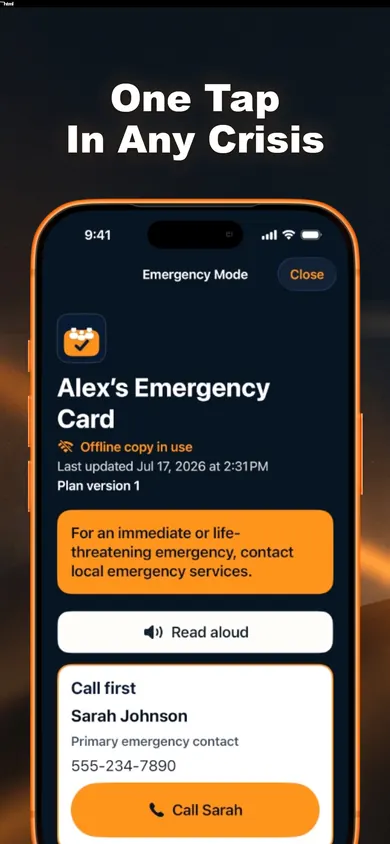
Step 3 is the one Family Ready does. The card opens without internet, in large text with no ads or pop-ups, and a Read aloud button. A neighbor with your spare key can open the free Emergency Snapshot PDF you printed and taped inside the door.
FAQQuestions people ask about living alone safely
What is the best safety app for someone who lives alone?
It depends which gap worries you. If nobody would notice for days, a daily check-in app such as Snug. If it’s a fall, a wearable that can call for help, such as Apple Watch with Fall Detection. And whoever arrives needs your Medical ID or an emergency card.
Is there a free daily check-in app?
Yes. Snug’s App Store listing describes a free daily check-in that alerts your contacts by text, with as many contacts as you like. Snuggy and Lunio send email alerts for free and keep texts for their paid tiers.
Does iPhone have a check-in feature?
Yes. Check In in Messages notifies a friend when you arrive or when a timer ends. If you don’t respond, it shares your location, battery and signal. You start it each time, and both people need iOS 17 or later.
Does Family Ready alert anyone if I don’t check in?
No. Family Ready has no check-ins, no fall detection and no automatic calls or texts. It holds the information a helper needs once they reach you. Pair it with a check-in app if that’s the gap you have.
Should I set up Medical ID on my iPhone?
Yes, it’s free and takes a few minutes in the Health app. Turn on Show When Locked so responders can see it without your passcode, and Share During Emergency Call so it goes to emergency services when you call or text them.
Do I need a medical alert pendant instead of an app?
If you may fall and not be able to reach a phone, an app you have to tap won’t help. A wearable that calls for help covers that gap. Ask your clinician about your fall risk before you choose.
Your resultWho should pick what
You said someone hears from you about every 3 days. A daily check-in would cut the worst case from about 72 hours to about 26.
With care, from the Honest Little Apps studio.